Thursday, 14 July 2016

How to Play Pokemon GO Game


In the last post, I had posted how to download Pokemon GO game in any country, Today, In this post, I will guide you how to play Pokemon Go Game.

What is Pokemon Go?

Pokemon Go is a mobile game for Android and iPhone user. The Pokemon Company and Niantic are a developer of this game. This game aim is to locate, catch, battle and trade Pokemon and encouraged to connect with other nearby Pokemon GO players.

Pokemon Go is a free Game or paid Game?

Pokemon Go is a free app but in this game, you have to buy PokeCoins which will unlock the unique items within in the game. PokeCoins is nothing but a game currency in the Pokemon Go Game.
You can buy PokeCoins at the following prices.

100 PokeCoins: $1.04
550 PokeCoins: $5.24
1200 PokeCoins: $10.50
2500 PokeCoins: $19.70
5200 PokeCoins: $39.42
14500 PokeCoins: $105.14.

Pokemon Go Plus Cost is $34.99, and it will be available soon.

How to Play Pokemon Go?


Select your Avtar

When you install Pokemon Go game, the first thing you need to select the clothing for your Avtar. (Note: Pick Carefully because once you choose the clothing for your Avtar, then there is no way to alter this later).

How to Catch Pokemon?

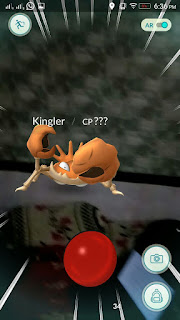
To catch Pokemon, you have to step out your home and explore the world. If you tap on the Pokemon, Camera will be open automatically, and it will show you a Pokemon somewhere near you. Pokemons are out there, and you need to find them. If your smartphone will vibrate it means, Pokemon is nearby. Take an aim and throw a PokeBall to catch them and finally, the Pokemon is your's (Note: You will have to stay alerted. or it might run away).

Where to search Pokemon?

Pokemon appear near their native environment like If Pokemon is a water type then Pokemon will be found in lakes and oceans. Pokemon will be found at interesting places like historical markers, museums, monuments and art installations.

How to earn Extra Points?

For every Pokemon, you catch you will get 100 XP points and 100 stardust. If you catch a Pokemon which you haven't seen before then, you will get an extra 500 XP, which will be added in the PokeDex. You will get extra XP points if you throw Pokeball perfectly.

How to earn extra PokeBalls?

You can collect more PokeBalls from PokeStops, which are mainly found in towns and cities or interesting places. You can also buy PokeBalls with coins in the Shop.

Catching, and Hatching

As your levels go up, you will be able to catch more powerful Pokemon to complete your Pokedex. You can also hatch Pokemon Eggs based on the distances you walk.

How to train your Pokemon?

To interact with the Gyms, your Level must be above five. Pokemon GO provides you three type of Gyms on the board: Neutral, Rival and friendly. You can also Evolve your Pokemon by providing training For e.g., Charmander evolves to Charmeleon and then Charizard.

What is a PokeBall?

A PokeBall is a ball which uses to catch the wild Pokemon. You can also collect more PokeBalls from PokeSops.

What is a PokeStop?

A PokeStop is a place from which you can easily win rewards by visiting it. In order to access you need to be near the PokeStop. If a blue circle appear, it means you are close enough, and If you visited the PokeStop it would turn to Blue.

What is PokeDex?

The PokeDex is a catalogue of all the Pokemon you have caught yet.

If you like this post, then do share or if you have any query then comment it below or if you have any problem in playing this game then also comment it below.

Wednesday, 13 July 2016

How to download Pokemon Go in any country

From last two weeks, you have been hearing about Pokemon Go Game. Pokemon Go Game is an adventurous game, and it will make your body fit by running and catching the Pokemon. If you have an Android Devices, and it will be available in your Country, then you can officially download Pokemon Go app from Play-Store, but if this game is unavailable in your Country, then you can download the APK file from other sites. Today, In this post we will see how to download Pokemon Go app in any country
Pokemon Go Game is available in America, Australia, NewZealand, Canda, Portugal, France and much more. To know more see the image below.
If you don't live in the above Country, then you have to wait for official launch or Download APK file from the other site.

To Download Pokemon Go Officially, Go to Play-Store and install Pokemon Go.

How to Download Pokemon Go unofficially?


There are two sites to Download Pokemon Go APK

To know How to Download Pokemon Go app from the site follow some steps.

  • Download Pokemon Go APK file from apkpure.com or apkmirror.com
  • If you are on Android phone, then you have first to Switch ONN the Unknow Sources. To Switch ONN the Unknown sources, Go to Settings >> Security >> and allow for the installation of apps from unknown resources.
  • If you are on a PC, then attach your phone via USB Cable and copy the APK file to your phone. 
  • Now, Install the Pokemon Go app and enjoy it.

Note:

  1. Pokemon Go app is a free app, and it is optimised for smartphones, not for tablets.
  2. Compatible with those Android devices which have 2 GB RAM or more and have Android Version 4.4 to 6.0.
  3. Pokemon Go won't work on Android N because Android N is a newly version of Android.
  4. It is not compatible with those Android devices which use Intel Atom processors.
  5. In some devices Application will not work even, they have compatible OS versions installed.
  6. To obtain accurate location you have to connect with a good network.
If you Like this post, then do share or If you have any query related to this topic then comment it below or have any problem to download the app then also comment it below.

Monday, 23 February 2015

Stencyl - A Game Without Code

Stencyl - Game without Code


                      Stencyl is a Game Creation Platform that allows user to Create a Game. This Software is Free. The Software Stencyl is written in Haxe and based on OpenFL. This Software Support all Platforms.

                      Haxe consists a High-level Multi-platform programming language and Compiler. From a Single Code Base, it can Produce many Source code and Application for Many Different Platforms. The haxe type system can Detect error at Compile time which would be seen in run time target Language. There are 9 Supported Language in Haxe.
  • JavaScript           Output Type: Source Code.
  • Neko                  Output Type: Byte Code.
  • PHP                    Output Type: Source Code.
  • Python                Output Type: Source Code.
  • C++                   Output Type: Source Code.
  • Actionscript 3      Output Type: Source Code.
  • Flash                  Output Type: Byte Code.
  • JAVA                  Output Type: Source Code.
  • C#                     Output Type: Source Code.


Open FL
                It is a Software Development Kit for Building Games and Applications for almost every Platforms like Windows, Mac, Linux, iOS, Android, Flash, etc. It is very easy to use.

Code in Stencyl

                Most of the people make game in Stencyl by Block snapping Interface. But you can also use codes in Stencyl. Those People who prefer to Coding rather than Block Snapping interface, Stencyl Provides you to type the Code inside the Behaviors. 

StencylForge


        StencylForge is a tool in Stencyl, where you will get all type of Actor, Platforms, Backgrounds, Sounds, etc.  You can also import the Character from your Computer.


Here are some videos to show how to make a Game in Stencyl.


If you have any problem please contact us.
e